Interfaces and Buses /
CAN /
Block Name: CAN_Bus
Code File Location: VisualSim/actor/lib/auto/CAN_Bus
Description
The
Controller Area Network ( CAN ) is a serial communications protocol
which efficiently supports distributed realtime control with a very
high level of security. What we have in visualsim is an extensive
library dedicated to all the protocols implemented in an Automobile.
CAN is one of them. It provides a very flexible network. Nodes can be
added without much difficulty. The following properties of the CAN has
been implemented in VisualSim :
[*] Prioritization of Messages
[*] Configuration flexibility
[*] Multicast reception with time synchronization
[*] System wide data consistency
[*] Multi master
[*] Error detection and signalling
[*] Automatic retransmission of corrupted messages as soon as the bus is idle again
[*] Distinction between temporary errors and
permanent faliures of nodes and autonomous switching off of defect nodes
[*] Both 11 bit and 29 bit can co-exist in the bus at the same time
Continuous monitoring for faults, generating various statistics like
power plots, latency, node activity etc are done in VisualSim.
Different test cases like what happens when a data frame and a remote
frame of same identifier competes for arbitration or how efficient
busOff recovery is? etc..
By validating all these test cases, one is able to identify all the
glitches or faults in their design and correct them in early stages.
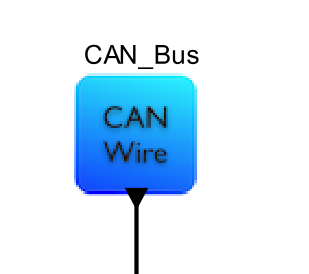
The
CAN_Bus module alone wont be functional. We need to add CAN_Nodes (
atleast 2 ) . The CAN_Nodes communicate to each other with the help of
arbitration algorithms and access controls defined in CAN_Bus. Click here to read up on CAN_Node.
To illustrate the usage, look at the following Examples in the BDE.
Click here to watch a video tutorial on designing an Automotive Network containing CAN Bus, TSN Gateway etc...
| Parameter |
Explanation | Type
|
Example | ||
| Sim_Time |
|
Double | 1.0 | ||
| FD_Enable |
|
Boolean | true | ||
| FD_Multiplier |
|
Double | 1.0 | ||
| Plot_Enable |
|
Boolean | true | ||
| CAN_Bus_Name |
|
String | "CAN1" | ||
| CAN_Mbps |
|
Double | 0.5 | ||
| Base_Rate |
|
Double | 1.0e-3 | ||
| Identifier_Bits |
|
Pull Down |
11 | ||
| Random_Bit_Stuffing |
|
Boolean | true | ||
| MSCAN_T_Manual_F_Auto |
|
Boolean | false |
||
| Manual_Reset_Flag_Name |
|
String |
"Reset_Flag" |
Database Templates:
Messages_DB
| Name |
Address |
Message |
ID |
DLC |
Cycle_Time |
StartBit |
Length |
Initial_Value |
Offset |
Minimum |
Maximum |
| ECU1 |
0x600 |
ABSData |
0x608 |
4 |
50 |
2 |
4 |
0 |
0 |
0 |
2048 |
Notes:
1. All ECU mentioned in the column "Name" should be linked to a CAN_Node. If the CAN_Bus cannot find the Node with the said name, then it will throw an error.
Example: I added a column with Name specified as ECU9 and I dont have any CAN_Node with the name "ECU9", then it will throw the following error:
CAN Wire (CAN1) cannot find a referenced Node: CAN1_ECU9 sets Error_Flag.
{CAN Wire simple means CAN_Bus}
2. The Address specified in the Address Column has to be unique. If not, CAN_Bus will throw an Error/Warning.
The Messages_DB is used in CAN_Node. This table is used for generating traffic packets synthetically from the CAN_Node according to the column value. The CAN_Node can also be configued to accept External inputs. which means, the CAN_Node wont be using this database for traffic generation. But, make sure the incoming packet Address is specified in the Address column of Messages_DB as well as the Message of the incoming packet should also match with Message column value.
If a CAN_Node opts for generating traffic from Database ( Please Refer CAN_Node documentation for more details on CAN_Node parameter configurations ), then the following cases needs to be checked by the user:
a. Length column value cannot be greater than DLC column value for the same Row
b. Address Column value and ID column value for the same Row cannot be same
c. Message DLC value should be greater than or equal to the sum of the signal DLC's. Which menas if Message DLC value is 4, then we cannot have 2 signals assigned with sum of thier DLC greater than 4.
d. Message DLC column values cannot be greater than 64 Bytes.
Signal_DB
| Name |
ID |
DLC |
Cycle_Time |
StartBit |
Length |
Initial_Value |
Minimum |
Maximum |
| CarSpeed |
0x608 |
4 |
10 |
8 |
4 |
10 |
0 |
2048 |
Notes:
1. An Entry for every Message ID specified in Messages_DB has to be specified in Signal_DB. Otherwise an error will be generated.
Example:
CAN1_Sensor_ECU1 Signal ID Column:
{"0x6108", "0x618", "0x068", "0x006", "0x168", "0x016", "0x268", "0x316"}
does not contain Message ID ("0x608"), suggest editing Signal or Message entries.
2. Signal Length values cannot be greater than Signal DLC value .
3. Multiple signals can be linked with a single Message. Useful in defining Signal Routing vs Message Routing. When having multiple signals linked , we have to make sure sum of the Signal Lengths are less than 64 Bytes. Else exception will be thrown. Same with Signal DLC values as well.
4. Sum of Signal Lengths cannot be greater than Signal DLC's.
5. Sum of Signal DLC's cannot be greater than he MEssage DLC that the signals are linked to.
Filering_DB
| Name |
Message_Array |
| ECU1 |
{"ABSData","EngineData"} |
| ECU2 |
{"none"} |
| ECU3 |
{"ALL"} |
Notes:
1. Messages are accepted on a CAN_Node according to the Message_Array specified for it.
2. The Array can contain multiple Message Names.
3. If the Message_Array contains "ALL", then all messages are accepted on that CAN_Node.
4. If the Message_Array contains "none", then no messages are accepted on that CAN_Node.
Power_Manager_Table
Notes:
1. This table follows default template that a Power MAnager follows.
2. When using multiple CAN_Networks, make sure to update this table with proper Device_Names. For each CAN_Node, an entry corresponding to it should be made in this table as well.
Format = Power_ + [ CAN_Bus name] + _ +[CAN_Node name]
Example = Power_CAN1_ECU1
3. The power state values are accepted in Watts.
4. This Power calculation is only for the CAN_Network and nothing external to this network. If the user wishes to integrate all the network and other SoC components power consumption all together, then place a PowerTable from Power library in the top level and plot them.
Each node can have a different termination resistance.
which means a different voltage. And the voltage value can be dynamic.
The computation of the Active power state can be a function of the volt.

From the above screenshot, we can see that, The power for each device is defined
separately. The active state power is the sum of the Tx and Rx power plus
the power transmission on the Wire. This includes the time that the
transmission starts to the time that it ends on the wire.
The standby
power is the beacon power of the Tx and Rx
The power
is unique for each Node connected to the Network
If the
device is turned off (Bus_Off), the power for each tx/Rx is in minimal possible
value but not exactly 0.0
The power is calculated as an expression based on the above items (ExpressionList Parameter section of Power_Table). We can also include the transmission resistance converted into volts plus other element values similarly.
For each device/Node, they have a separate row and
calculated values will vary between devices, if the user wishes to provide
different configuration values for each devices.
For example:

We can see that the Volts column for 4 devices are
different. So, since all power state calculation are linked with the Volts and
Mhz column, the calculated power for each device will be different.
By default,
all devices are in Standby state. If any device has been manually reset
or due to errors, the power is in the Bus_off state.
When the
device starts transmitting, the power turns to active state. This
continues until all the bits have completed been transmitted. All other
devices are in standby state.
Accepting Input from External sources:
If we have the ECU designed in another part of the system and doesnt want to generate traffic from the Database synthetically, then we can configure the CAN_Node modules to accept the inputs. For this to happen, we have to set false value to the Enable_Sensor_DB parmater of CAN_Node.
The incoming packet should have some required fields and they are:
| Field_Name |
Description | Example |
| IDE |
Required for specifying the Identifier.0 for 11 bits and 1 for 29 Bits. | 0 |
| DLC |
It should be less than 64 Bytes | 8 |
| ID |
USed to specify the Message ID |
"0x108" |
| Message |
Specify the Message name | "ABSData" |
| Length |
Specify the Length in Bytes |
8 |
| Error_Flag |
Specify the State of the Error_Flag. If True, then it is an Error Frame. |
false |
| Overload_Flag |
Specify the State of the Overload_Flag. If True, then it is an Overload Frame. | false |
| RTR_Bit |
Specify the State of the Remote_Bit. If True, then it is a Remote Frame. Else Data frame. |
false |
| A_Source |
To Specify the Source which generated this traffic |
"Brake_ECU" |
| Address |
The Address Mentioned on this field should also be specified in the Messages_DB and Signal_DB |
"0x608" |
Notes:
When providing ID field, User can use the setField function.
Example: input.setField ("ID","0x168")
Format is : data_Structure.setField("Field",value)
| Port | Explanation |
| wire | Sends out data to all CAN_Nodes connected to the Network |
The Wire Port has to be connected to the rx and tx ports of CAN_Node. When connected all up, it should look like the following:
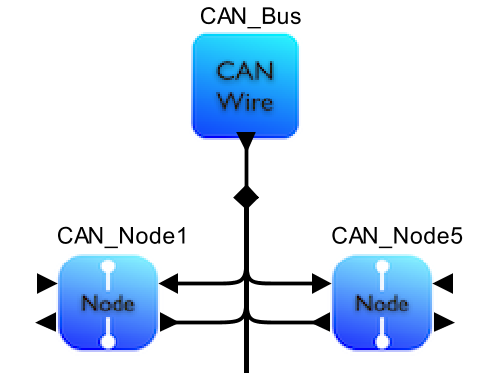
Note:
The structure of a Default CAN_Node has rx and tx ports on the right side. But on CAN_Node5 the rx and tx ports are on left side. It is because the ports are flipped horizontally. It can be done by right click on CAN_Node -> Appearence -> Flip Ports Horizontally
For users with older version:
Please make sure that CAN_Nodes are instantiated first before the CAN_Bus is instantiated , when building a model from scratch.