
The following is a summary of the concepts you will learn in this session.
Use schedulers to define the resources in a system
Use the channel blocks to define distributed activities
Manage the Cache/SDRAM usage information with VisualSim memory elements
In this section we will focus on the effect of using a shared DMA for memory access. The model has multiple resources that consume time in the flow. There are some devices with direct connections to the DMA and others are connected to it via a Bus. This tutorial will help the user understand the TimedQueues and Channels, and the generation of latency plots.

Figure 1: Block Diagram of the Multi-Channel DMA Design
Open this model in VisualSim from the following location:
File->Open $VS/doc/Training_Material/Tutorial/WebHelp/Tutorial/Performance_Modeling/DMA_Exercise.xml
Click here to view the demo model.
Identify the resources and the flows
What block should be used to model the DMA?
What is the traffic generation schemes to be deployed?
Make hit-and-miss decisions
Source->Traffic->Transaction_Source
Defining Flow-> Processing
Defining Flow-> Decision
Defining Flow->IN
Defining Flow->OUT
Delay and Utilities->Isolate_Input
Result->Text->Text_Display
Result->Text->xTime_yData_Plotter
Resource->Timed-Queue->TimedQueue
Resource->Channel and Pipeline->Channel
Resource->Channel and Pipeline->Channel_Release
Parameters for the model are:
µP1- Speed=500MHz, Data Size=24 bytes, ID="µP"
DSP1- Speed=266MHz, Data Size=16 bytes, ID="DSP"
OH1- Inter-arrival time between 100-200 µs, Data Size= 64 bytes, ID= "OH1"
OH2- Inter-arrival time of 150 µs, Data Size= 8 bytes, ID= "OH2"
DMA- packet size=64 bytes, buffer=32
Bus- Speed=266MHz
Cache- Speed=266MHz
SDRAM- Speed=133MHz
Model Variables: How do you include this in the model?
DMA speed =< 266 MHz
Number of DMA channels = 4-16
Cache hit ratio = 0.7-0.9
Simulation Output
Plot the request latency from µP and DSP when accessing SDRAM
Print the complete DS when the data has been accessed. In this case, assume all transactions to be a Write. So, there is no return path.
Analysis
Is there is a relation between the cache hit ratio and the miss latency?
Which parameter (Cache hit ratio, DMA speed and DMA channels) has the biggest impact on the latency?
The Construction of the above model in a step-by-step manner is described below.
Open a new block diagram by selecting File->New->Block Diagram.
Drag the Digital block (Model->Simulator->Digital) onto the block diagram. Make parameter "StopTime = 5.0e-6” (user-defined value). Maintain the default for all other values.
Setup the Parameter (Model->Parameter-> Parameter=) as shown below:
Bus_Speed = 266
UP_Speed_Mhz = 500.0
DSP_Speed_Mhz = 266
SDRAM_Speed = 133
DMA_Speed = 500
DMA_Packet_Size = 32
Cache_Speed = 266
Cache_Hit_Ratio = 0.9
Setup the Traffic using Transaction_Source (Source->Traffic->Transaction_Source) for µP, DSP, OH1 and OH2.
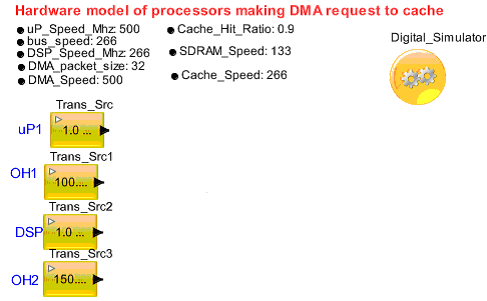
Figure 1. Traffic Generation
Drag the Processing block from Defining_Flow->Processingto define the transaction Field (by double-clicking the block). Setup the field values such as Source_Name, Transaction_Bytes, Hit_or _Miss, and Timing Delay
µP1 and OH1

Figure 2. Parameter value for µP1 and OH1
DSP and OH2

Figure 3. Assign the Field value for DSP and OH2
Drag the TimedQueue block (Resource -> Timed-Queue -> TimedQueue) and pop-out the token according to the Transaction_Bytes / bus_speed_Mhz.
Setup the DMA block (Resource -> Channel and Pipeline -> Channel) and the DMA Release block (Resource -> Channel and Pipeline -> Channel_Release).

Figure 4. DMA Access

Figure 5. Channel Parameter Setup
Pass the Token through the Virtual Connection (Defining_Flow -> IN and Defining_Flow -> OUT) to the Cache containing TimedQueue which triggers the token according to the Transaction_Bytes / Cache_speed_Mhz.

Figure 6. Cache Access
Verify the Cache Hit or Miss using Decision block (Defining_Flow -> Decision)
If Cache Hit, display the output
If Cache Miss, access the SDRAM
Cache Hit or Miss Calculation:
Result_A = (input. Hit_or_Miss <= Cache_Hit_Ratio)?True: False
In case of Cache_Miss, pass the token into the SDRAM (TimedQueue) and Pop-out the Token according to the Transaction_Bytes / SDRAM_speed_Mhz.

Figure 7. Cache Miss access the SDRAM
Derive the latency for Cache_Miss (uP_Cache_Request_Latency, DSP_Cache_Request_Latency) and Cache_Hit and plot it.
uP_Cache_Request_Latency = TNow - input.TIME
DSP_Cache_Request_Latency = TNow - input.TIME

Figure 8. Multi Channel DMA Design