MDI_Logo
Customers   |   Contact Us   |  Evaluation  |  Demonstrations   |    
    Company     Technology     Products
Home | Demonstrations | Networking & Protocols | Traffic Management for QOS

      Traffic Management with Flow Control using Back Pressure

VisualSim provides a graphical modeling and simulation environment to conduct traffic analysis and performance analysis. Using this environment, the user can construct a queuing or statistical model with the pre-built modeling library. The model can contain traffic generators, analysis tools and resources to resemble the different devices. These resource blocks can emulate masters such as processor and servers; intermediate channels such as Xon-Xoff flow control; and slave devices. Credit policy can be described with knowledge of the statistics such utilization and latency of forward devices. The model will generate statistics for queue utilization, buffer occupancy, throughput and identify design issues such as buffer overflow and system slow-down/point of failures.

Experiments by customers have shown accuracy of over 90% with this VisualSim approach. Moreover, this analysis is done prior to any implementation. Hence the rework cost is almost fully eliminated. This example shows the application of a backward pressure based on a buffer occupancy threshold of the Egress queue.

The VisualSim model associated with this description is provided below. You can view, change parameter values and run simulation right from within the Web Browser. No additional software is required. This shows how you can use a pre-built VisualSim model for doing trade-studies.

To use the models at the links, click on the GO button to run the simulation. Double-click on any parameter in the model window to change the parameter value.

Click here to view the interactive VisualSim Block Diagram and model (Model 1)

Click here to view and execute the VisualSim model (Model 2)

Note: This model is a good example of QOS analysis where backward pressure is based on certain algorithm that depends on the details of the buffer. This is also good for arbitration and contention resolution in Ethernet and Wireless LAN (802.11). The model is scalable to easily vary the data size, input traffic rate, threshold levels and queue depths. Using a parameter value of the model, the number of Ingress and Egress queues can be changed.

A traffic manager is modeled to determine efficient parameters for the forward queue processing Round-Robin algorithm and to construct an optimal back pressure to manage congestion. The goal is to have a QOS that ensures maximum latency does not exceed the set threshold.

System Overview

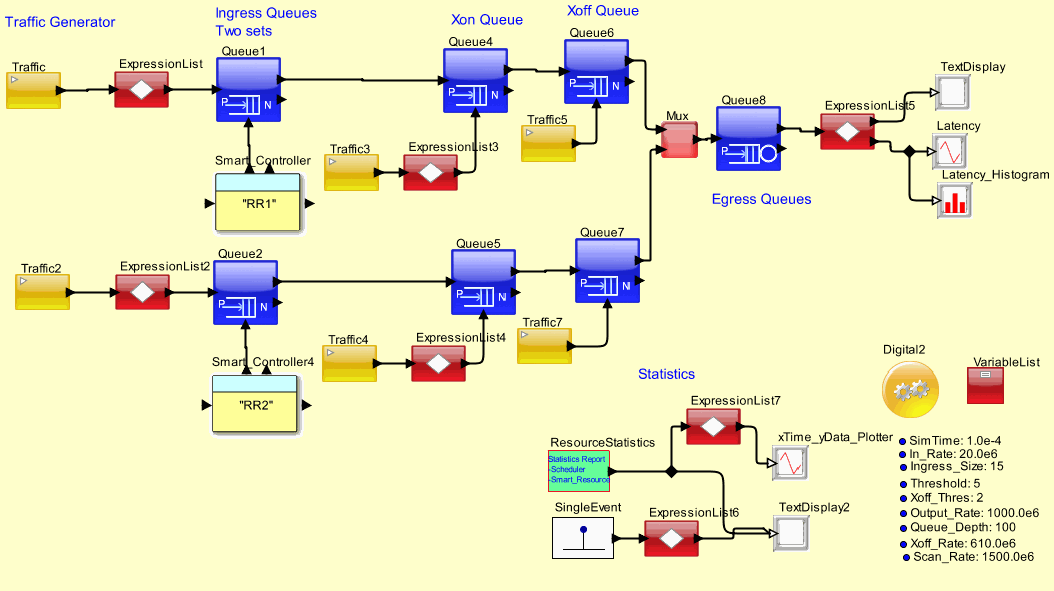
The system is show in Figure 1. 12B frames are transmitted to the traffic forward queues at the rate of 200MHz. There are variable number of forward queues upto a maximum of 1024. The output from this set of queues are frames of 36B at 200MHz. This means that 3 frames are combined at the forward queue before transmitting. The combined frames are fed to another set of queues that are again a variable number upto a maximum of 64. The queues in the forward section are mapped to a specific ouput queue and will transfer to that output queue only. When the depth of the output queue exceeds a threshold, a back pressure is applied from the output queues to the forward queues to stop transmission.

Go To Top
Block Diagram of the Traffic management Systems
Figure 1: Block Diagram of the Traffic Management Systems

Model Parameters:

Incoming frame size = 12B     Incoming rate = 200 MHz
Outgoing frame size = 36B     Outgoing rate = 200 MHz

Number of forward queues = vary between 64-1024           Depth of forward queues = 30 frames
Number of output queues = vary between 8-64                  Depth of output queues = 20 frames

Backward pressure trigger point = 7 frames in the output queue

Go To Top

The model is broken down into the following sections

1. Traffic source: The source has a input rate with a uniform distribution.
2. Setting up the forward and output queues
3. Writing to the forward queue
4. Removing from the output queues
5. Round-robin algorithm
6. Applying Backward Pressure
7. Reading from the forward queue and placing them in the output queue along with the estimated processing time in the output queue: The process of transferring the data from the forward queue to the output queue is done once the backward pressure has been evaluated and the forward queue is free to send the data. This is done by first removing the data from the Forward Queue, computing processing delay at the output queue and then placing the frames in the associated output port queue along with the processing time.
8. Statistics has been gathered on the forward and output queues, and the latency of each frame at the exit of the output queue. The latency is computed by calculating the time from the packet generation to the exit of the output queue ("DELTA = TNow - TIME").
Go To Top

Analysis

Two results are captured in this model. The first is the statistics of the forward and output queue occupancy while the second is the end-to-end latency of the each frame. There are considerable spikes in the latency curve indicating the unpredictable nature of this algorithm.

This indicates that the design did not scale well. The forward queues are somewhat overdesigned. Also, the back pressure is never triggered as the data is not arriving fast enough. The round-robin algorithm can be improved using a weighted average by adding more knowledge about the content of the queues.

Go To Top
  Copyright 2008© Mirabilis Design Inc. All Rights Reserved.